Thanks to ClickFlare’s API integration with SmartNews, you can automatically pull the cost data of your SmartNews campaigns directly into ClickFlare.
This lets you centralize spend tracking, reporting, and optimization across platforms, without manual cost uploads or spreadsheets.
What you'll need for the integration
- An active ClickFlare account
- Valid SmartNews Ads ad account
- Your SmartNews Client Secret/Client ID
How SmartNews Cost Integration Works
ClickFlare connects to the official SmartNews Ads API and automatically retrieves your campaign spend.
Once connected, ClickFlare pulls cost data from SmartNews at the following levels:
-
Campaign level
-
Ad group level
-
Ad level
Only the data is fetched directly from SmartNews.
Other performance metrics, such as CPC, CPM, CTR, and ROI, are calculated inside ClickFlare using:
-
Cost data from SmartNews
-
Clicks/impressions tracked by ClickFlare through your tracking URLs
This keeps all your key performance metrics consistent and up to date in a single dashboard.
Follow the steps below to connect your SmartNews account to ClickFlare.
1. Setting Up the SmartNews Cost Integration
- In ClickFlare, open the left-side menu and go to
Integrations → Cost Tracking Integrations. - Click Add Integration.
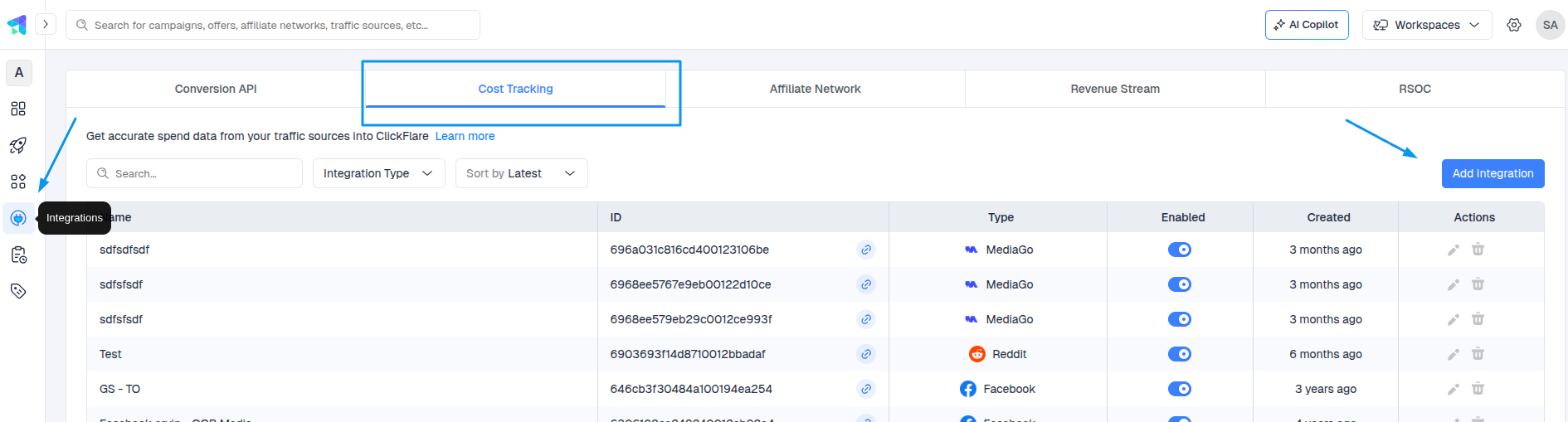
- From the list of available integrations, select SmartNews.
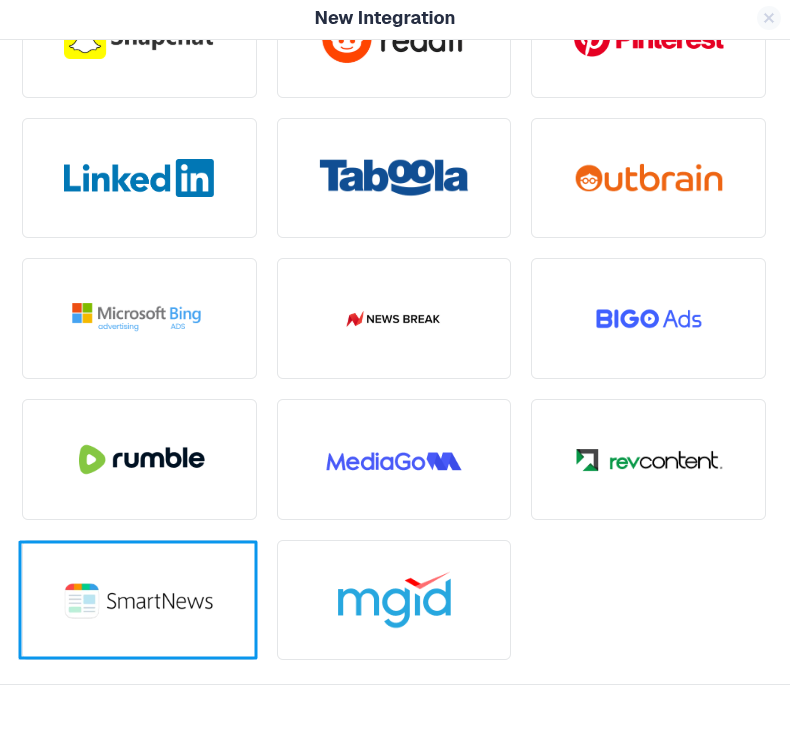
2. Generating the client secret
- Log in to Business Manager
- Navigate to the [Developer App Management] section and click [Register Developer App Information]
- Enter the name you used in the developer application form for the app name
The official guide: SmartNews Guide
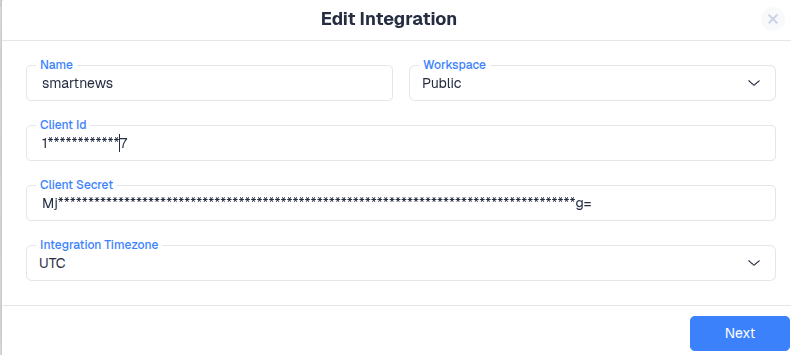
3. Select Ad Accounts
Once your SmartNews credentials placement is done, click Next and choose which ad account(s) you want ClickFlare to pull cost data from.
-
You can select one or multiple ad accounts under the same SmartNews profile.
-
ClickFlare will automatically sync campaign spend for each selected ad account.
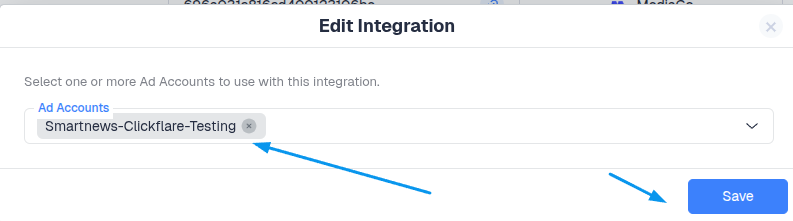
In most cases, you only need one SmartNews cost integration per SmartNews login. Within that integration, you can include multiple ad accounts that your user has access to.
4. Assign to a Traffic Source Configuration
You can optionally link your SmartNews cost integration directly to one or more Traffic Source Configurations in ClickFlare.
-
If you do this here, ClickFlare will automatically use this cost integration whenever that SmartNews traffic source is selected in a campaign.
-
If you skip this step, you can always assign the integration later inside the Traffic Source settings.
Make sure the Traffic Source template you select here is SmartNews.
Using a traffic source different from the template can prevent spend from being matched to your campaigns correctly.
When you’re done, click Save.
5. Verify Cost Data Sync
After saving the integration, ClickFlare will start syncing cost data from SmartNews automatically.
To verify everything is working:
-
Open any active SmartNews campaign in your ClickFlare reports.
-
Look at the Cost column.
-
Confirm that you see cost values that match what you see in SmartNews Ads Manager (after allowing for the sync delay).
The cost update frequency depends on your ClickFlare plan and whether you have a faster cost-update add-on enabled.
Cost pulls can range from every 60 minutes down to every 5 minutes for eligible plans and add-ons.
How Cost Matching Works
ClickFlare matches SmartNews cost data to your campaigns based on:
-
Unique SmartNews campaign and ad identifiers
-
Tracking parameters passed through your campaign URLs
When you use the SmartNews Traffic Source template in ClickFlare:
-
All required macros/parameters are automatically added to your tracking URLs.
-
SmartNews campaign/ad IDs are captured by ClickFlare and used to align incoming cost data with the correct campaigns, paths, and reports.
This way, spend, clicks, and conversions stay perfectly in sync across both platforms without extra manual configuration.
FREQUENTLY ASKED QUESTIONS
Got questions? Find the answers below:
Q1: Do I need to tag my SmartNews URLs differently for cost tracking?
A1: No additional tagging is required beyond using the SmartNews traffic source template in ClickFlare. That template already includes the parameters needed for cost matching.
Q2: Does the integration pull impressions, clicks, or conversions from SmartNews?
A2: The SmartNews cost integration is focused on spend. Clicks, impressions, and conversions are tracked directly by ClickFlare (or via your conversion setup), and combined with SmartNews cost data for full performance reporting.
Q3: Can I use multiple SmartNews integrations in the same account?
A3: Yes. For example, you might use separate integrations for different teams or business units. Just make sure each SmartNews integration is assigned to the correct Traffic Source Configurations and Workspaces (if you’re using Workspaces).
