Dynamic Value Formulas allow you to calculate, modify, or transform values before they are sent from ClickFlare.
Instead of sending raw placeholders like {payout}, you can apply logic directly inside:
-
Conversion API integrations
-
Traffic source postbacks
- Lander and Offer URLs
-
Custom webhook integrations
This allows you to:
-
Send a percentage of revenue
-
Apply revenue share automatically
-
Cap or adjust payouts
-
Format string values
-
Apply conditional logic
-
Build advanced tracking logic without external scripts
How Dynamic Value Formulas Work
Dynamic formulas use this format:
${expression}
The $ prefix tells ClickFlare that this is a formula and must be evaluated before sending.
Inside the formula, you can reference placeholders using:
{placeholder_name}
Placeholders are resolved first. Then the formula is calculated.
Basic Example
https://offer.com?cid={click_id}&v=${multiply({payout}, 2)}
What happens:
-
{payout} is replaced with the actual payout value
-
multiply(value, 2) is evaluated
-
The calculated result is inserted into the URL
If payout = 50 → final result becomes:
v=100
Where You Can Use Dynamic Value Formulas
You can use formulas anywhere placeholders are supported:
-
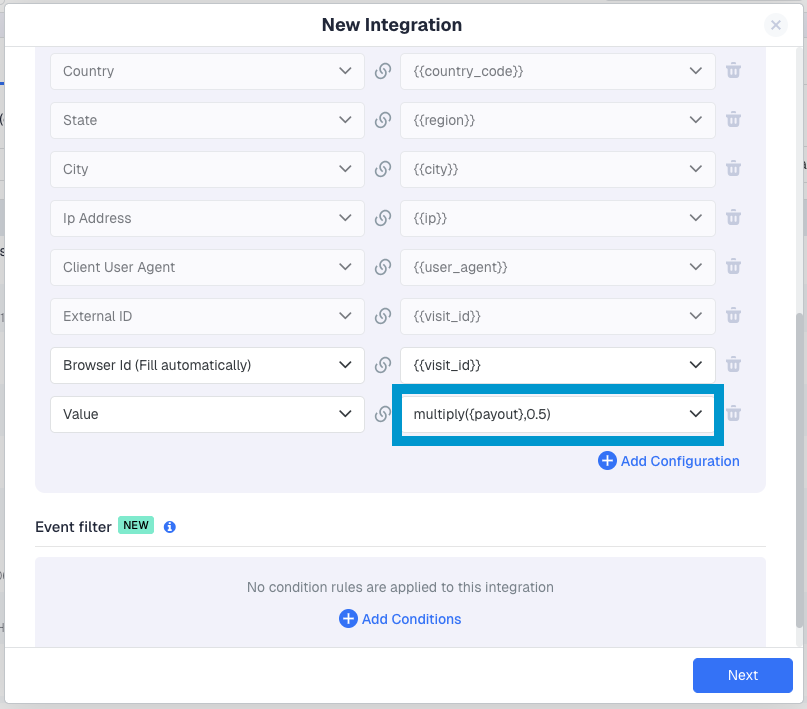
Conversion API integrations
-
Traffic source postback URLs

-
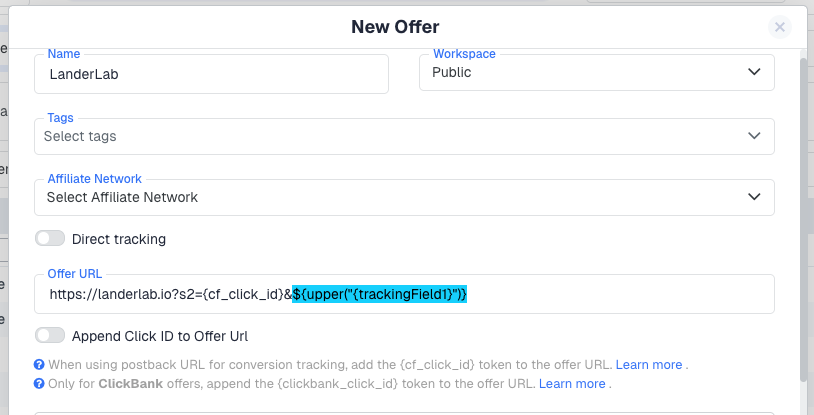
Lander and Offer URLs
-
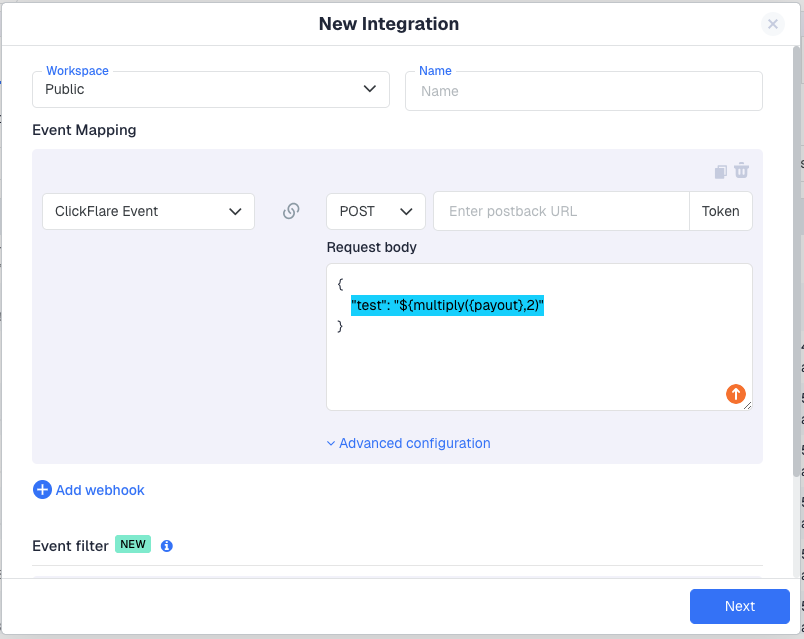
Custom Webhook integrations
Using Dynamic Value Formulas in Integrations
Example 1 – Send 50% of Revenue in a Webhook
In a Custom Webhook request body:
{
  "value": "${multiply({payout}, 0.5)}"
}
If payout = 100 → webhook receives:
"value": 50
Example 2 – Adjust Value in Conversion API Integration
In the Value field:
${multiply({payout}, 0.5)}
ClickFlare will automatically send half of the payout.
Available Formula Functions
Math Functions
Used to calculate or adjust numeric values.
| Function | Description | Example |
|---|---|---|
| multiply(a, b) | Multiply two numbers | ${multiply({payout}, 2)} |
| add(a, b) | Add two numbers | ${add({payout}, 10)} |
| divide(a, b) | Divide two numbers | ${divide({payout}, 3)} |
| round(n) | Round to nearest integer | ${round(divide({payout}, 3))} |
| floor(n) | Round down | ${floor(divide({payout}, 3))} |
| ceil(n) | Round up | ${ceil(divide({payout}, 3))} |
Practical Math Examples
Send 30% revenue share
${multiply({payout}, 0.3)}
Add fixed bonus
${add({payout}, 5)}
Split payout evenly
${divide({payout}, 2)}
Round payout after calculation
${round(divide({payout}, 3))}
String Functions
Used to format tracking fields or other string parameters.
| Function | Description | Example |
|---|---|---|
| upper(s) | Convert to uppercase | ${upper("{trackingField1}")} |
| lower(s) | Convert to lowercase | ${lower("{trackingField1}")} |
| trim(s) | Remove whitespace | ${trim({trackingField1})} |
Example
If {trackingField1} contains:
premium_user
Using:
${upper(trim({trackingField1}))}
Result:
PREMIUM_USER
Conditional Logic
if(condition, then, else)
Allows dynamic decision-making.
| Function | Description | Example |
|---|---|---|
| if(condition, then, else) | Return value based on condition | ${if({payout} > 100, "premium", "standard")} |
Conditional Examples
Tiered value logic
${if({payout} > 100, 50, 20)}
If payout = 150 → sends 50
If payout = 80 → sends 20
Cap maximum payout
${if({payout} > 100, 100, {payout})}
Nesting Formulas
Formulas can be combined.
Example:
${multiply(add({payout}, 10), 0.7)}
What happens:
-
Add 10 to payout
-
Multiply result by 0.7
Mixing Placeholders and Formulas
You can use both in the same URL:
https://offer.com?cid={click_id}&value=${multiply({payout}, 4)}&cmp={var:cmp_id}
-
{click_id} → simple placeholder
-
${multiply(...)} → formula
-
{var:cmp id} → custom parameter
String Quoting Rules
Numeric values
Numeric placeholders are inserted directly:
${multiply({payout}, 2)}
String values
You can use:
Quoted:
${upper("{trackingField1}")}
Unquoted (auto-quoted if needed):
${trim({trackingField1})}
Encoded URLs
Dynamic Value Formulas also work inside encoded URLs.
Example:
$%7Bmultiply(%7Bpayout%7D,%202)%7D
ClickFlare automatically decodes before evaluating.
Error Handling
If a formula cannot be evaluated:
-
Unknown function
-
Missing placeholder
-
Null value
-
Type mismatch
The formula remains unchanged.
Example:
Input:
https://offer.com?v=${multiply({payout}, 2)}
If payout is missing:
Output:
https://offer.com?v=${multiply({payout}, 2)}
This prevents broken URLs or corrupted postbacks.
Real-World Use Cases
Revenue share with traffic source
${multiply({payout}, 0.6)}
Tier-based payout
${if({payout} > 200, 80, if({payout} > 100, 40, 10))}
Normalize campaign names
${lower(trim({campaign_name}))}
Best Practices
-
Always wrap formulas in ${}
-
Use {placeholder} inside formulas
-
Test complex nested formulas before going live
-
Use rounding functions if traffic sources require integers
-
Keep logic readable
Summary
Dynamic Value Formulas allow you to:
-
Automatically apply revenue share
-
Adjust payouts dynamically
-
Add conditional logic to tracking
-
Format values before sending
-
Build advanced tracking flows without middleware
This feature makes ClickFlare significantly more flexible and powerful for advanced tracking setups and custom integrations.
FREQUENTLY ASKED QUESTIONS
Got questions? Find the answers below:
Q1: Do I always need to use ${} for formulas?
A1: Yes. Dynamic Value Formulas must always be wrapped in:
Without the $ prefix, ClickFlare treats the content as a normal placeholder or plain text and will not evaluate it.
Q2: Can I use formulas anywhere in ClickFlare?
A2: You can use Dynamic Value Formulas anywhere placeholders are supported, including:
-
Conversion API integrations
-
Traffic source postbacks
-
Offer URLs
-
Lander URLs
-
Custom webhook request bodies
Q3: What happens if the payout value is missing or null?
A3: If a formula cannot be evaluated (for example, {payout} is null), the formula remains unchanged.
Example:
${multiply({payout},2)}If payout is missing, the expression will not be replaced. This prevents broken URLs or corrupted requests.
Q4: Can I combine multiple formulas together?
A4: Yes. Formulas can be nested.
Example:
${multiply(add({payout}, 10), 0.7)}This:
-
Adds 10 to payout
-
Multiplies the result by 0.7
Q5: Can I use formulas with string values?
A5: Yes. You can use:
-
upper()
-
lower()
-
trim()
Example:
${upper("{trackingField1}")}If the value contains spaces or mixed case, it will be normalized before being sent.
Q6: Are formulas evaluated before or after placeholders?
A6: Placeholders are resolved first. Then the formula is evaluated.
Flow:
-
{payout} → replaced with actual number
-
`${multiply(...)} → calculated
-
Final value inserted into URL or request body
Q7: Do formulas work in URL-encoded URLs?
A7: Yes. Encoded expressions such as:
$%7Bmultiply(%7Bpayout%7D,%202)%7Dare automatically decoded before evaluation.
